 WonderVision
Designed for low vision, from the first line of code
Games you can actually see.
Enormous high-contrast targets. A sound and a gentle buzz for everything that happens. No timers, no penalties, and no way to lose. Six games and 90 levels for iPad and iPhone.
- Free to start
- Plays offline
- No ads
- No subscription
- No account
Why it is different
Accessibility was not added at the end. It is the whole design.
Most games call themselves accessible because there is a colorblind palette and a text size slider buried in the options. WonderVision started from a harder question: what would a game look like if the person playing it could not rely on the middle of their vision, could not tell similar colors apart, and needed contrast far beyond what looks fine to a designer with 20/20 eyes? Every answer is built into the engine, not into a settings screen.
Targets you cannot miss
Shapes are roughly 150 to 250 points across, which on an iPad is something like an inch and a quarter to two inches of glass. Difficulty rises by adding more of them and clearing them sooner, not by shrinking them. The smallest target in the hardest level is still bigger than most apps' biggest button.
Generous by default
Every tap gets an extra 44 points of grace radius around the target, so a near miss still counts. Nothing anywhere in the app is tappable below 64 points, and the primary buttons are far larger than that.
Color is not the only signal
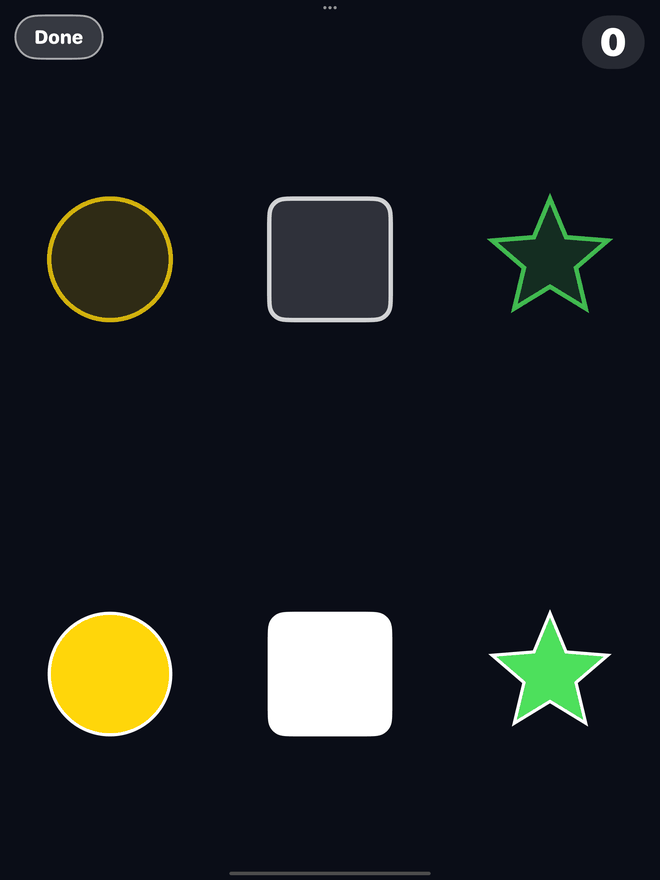
The five game colors are a yellow star, a blue circle, a pink heart, a green triangle and a white square. Hue, shape and spoken name always travel together, so nothing depends on telling two similar colors apart.
Heard and felt, not just seen
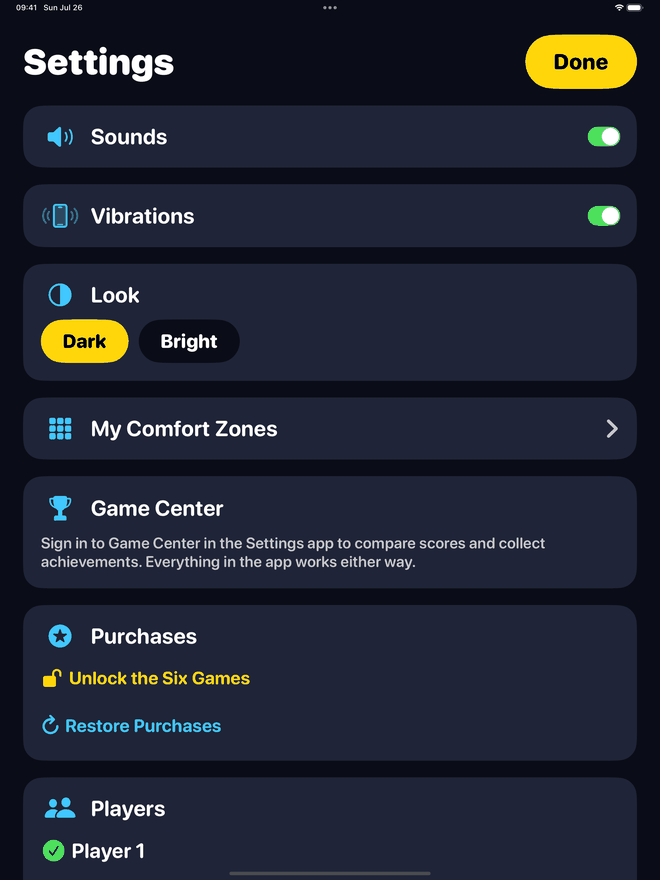
Every pop, catch, snap and chime has a matching sound and a matching vibration. You can follow a whole round by ear and by hand. Both are switchable in Settings, and every sound is generated by the app rather than downloaded.
Menus that are part of the product
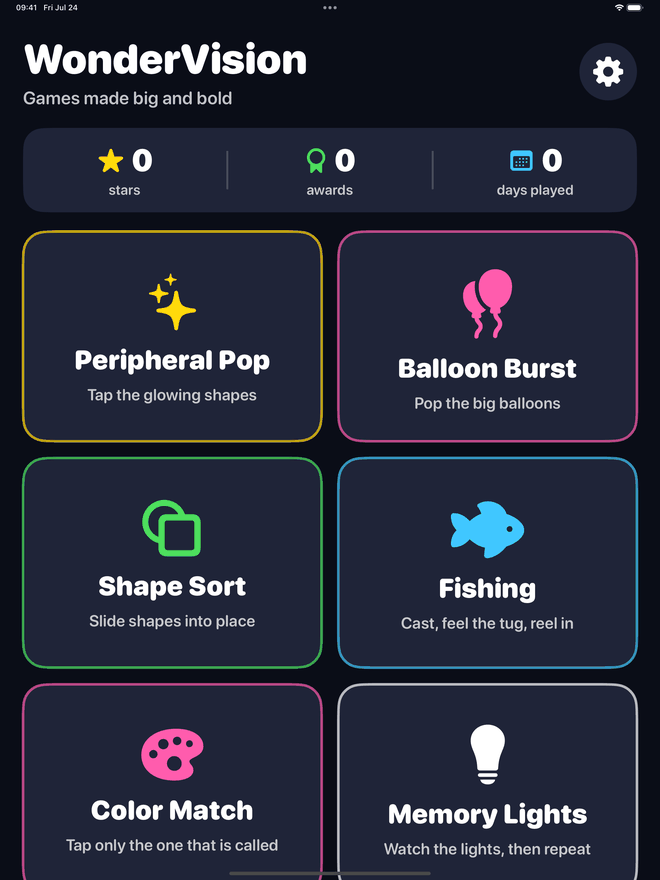
No tiny lists, no chevrons to hunt for. The hub is a grid of giant panels with bright outlines, headings run to 56 points, and every element carries a plain spoken label such as "yellow star" for VoiceOver.
Dark or Bright, your call
Games always run on a deep navy background because that is where the five hues separate best. The menus come in Dark or Bright, whichever your eyes prefer today. One tap in Settings.
Comfort Zones
Tell it where you see well. It plays around the rest.
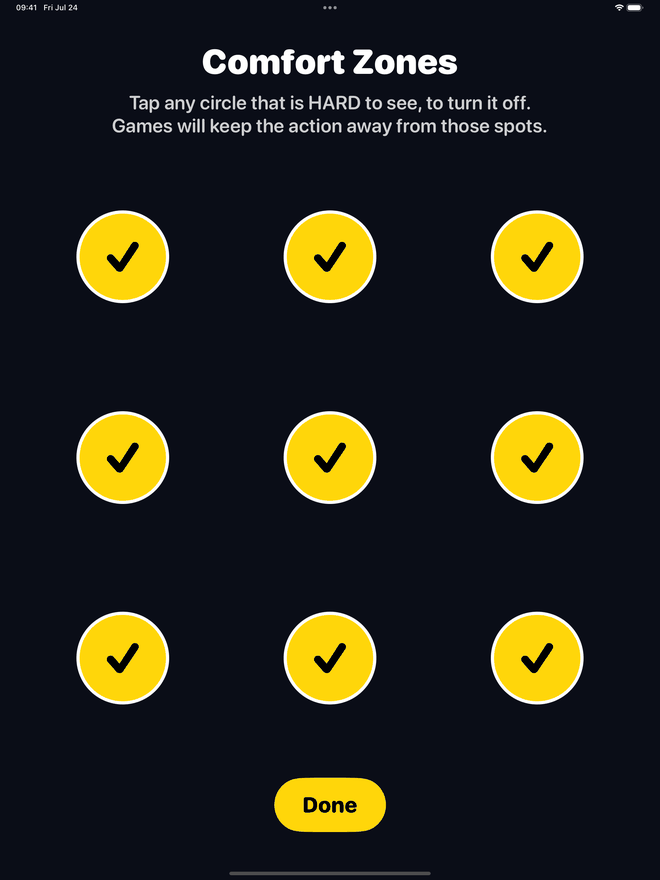
This is the part a settings screen cannot give you. On first launch you get nine big circles in a three by three grid and one instruction: turn off any that are hard to see. That is the whole setup, and it takes about fifteen seconds.
- Every game respects it. Anything the app places on screen is steered toward the zones you kept and away from the ones you switched off.
- The center is not sacred. If the middle of the screen is unreliable for you, turn it off and the games stop asking you to work there.
- Redo it any time from Settings, on a good day or a bad one. Nothing is locked in.
- Per player. Two people sharing an iPad each get their own map, so nobody is stuck with someone else's setup.
- It is a comfort setting, not a test. Nothing is scored, nothing is diagnosed, and no result is recorded anywhere.
No clocks, no losing
Nothing here is in a hurry, and nothing here judges you.
Reaction-speed games are exhausting when the picture takes a moment to resolve. So WonderVision has no countdown timer anywhere, not even as an option, and there is nothing to fail.
- Missed a target? It fades away. No buzzer, no red flash, no combo broken.
- Dropped a shape in the wrong place? It glides quietly home and waits for you.
- Fish got away? It swims off with a friendly note and you cast again.
- Finishing a level always opens the next one, however the round went. Nobody is stuck behind a score.
- Stars measure attention, not speed. They count the things that slipped past, and you have all the time in the world to avoid each one.
The games
Six games. One set of rules that stays out of your way.
Each one runs two ways: Free Play, which is endless and has no goal at all, or a ladder of 15 levels with a target to reach and up to three stars. Every game ends in the same result card, so a quiet five minutes still counts for something.
Peripheral Pop
Tap the glowing shapes.
Big bright shapes appear one at a time around the outer band of the screen, deliberately away from the middle, and wait several seconds for you. Nothing rushes and nothing is scored on how fast you were.
Balloon Burst
Pop the big balloons.
Fat balloons drift slowly upward with a satisfying pop and a buzz for each one. A balloon takes nine or ten unhurried seconds to cross the screen in Free Play and the early levels, so there is plenty of time to line one up.
Shape Sort
Slide shapes into place.
Three or four enormous shapes and their matching outlines, nothing overlapping, nothing fiddly. Drop one near the right home and it snaps in. Drop it anywhere else and it slides quietly back to wait for you. "Wonderful!" between boards.
Fishing
Cast, feel the tug, reel in.
The one you can play almost entirely by feel. Cast, then wait. Soft little nibbles buzz first, and when the big tug comes you tap anywhere on the screen. Land a Sunfish, a Bluegill, a Rosy Perch, a Green Bass or a Silver Minnow.
Color Match
Tap only the one that is called.
A banner names the color you want in words and shows its shape beside it, in huge type, and you find it among the others. Because the name and the shape both identify it, nothing depends on separating two similar hues by eye.
Memory Lights
Watch the lights, then repeat.
Four quarter-screen panels, one in each corner with an empty cross through the middle, each with its own color, its own shape and its own musical note. A wrong tap simply replays the sequence for you. Nothing ends.
Two ways to play
Just play, or climb the ladder. Both count.
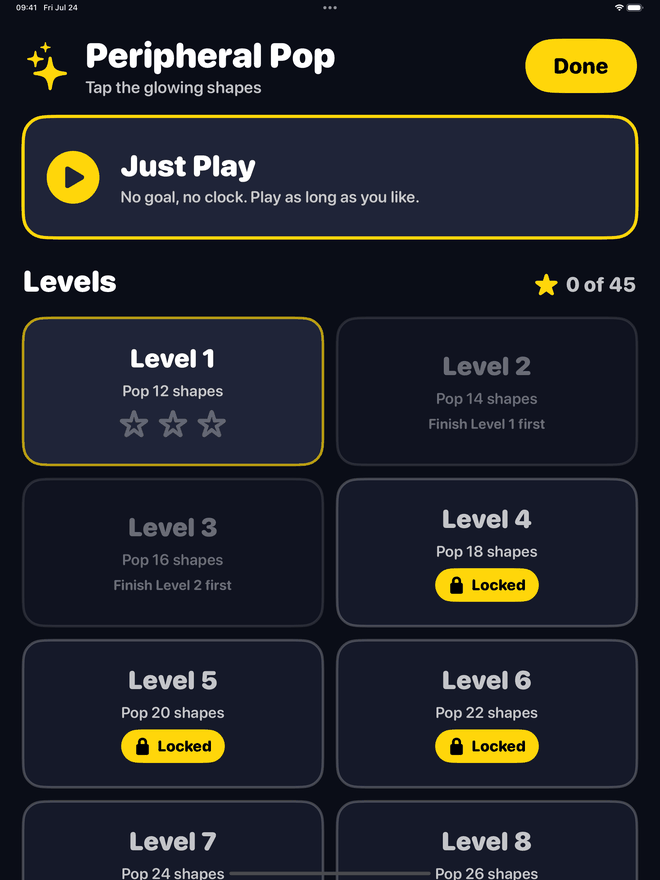
Every game opens on a giant Just Play panel: no goal, no clock, play as long as you like. Under it sits the level ladder, 15 rungs per game, each with a goal in plain words like "Pop 12 shapes" or "Catch 3 fish".
- Goals count good things, not seconds. There is no clock to beat.
- Difficulty rises kindly: more targets and a shorter wait between them, not smaller targets and not a harsher penalty. Later Fishing levels bite sooner, so a long level does not turn into a long sit.
- Free Play has a result card too, where your score is measured against your own previous best and nobody else's.
- 90 levels in all, 15 for each of the six games.
Something to come back to
Progress that only adds up.
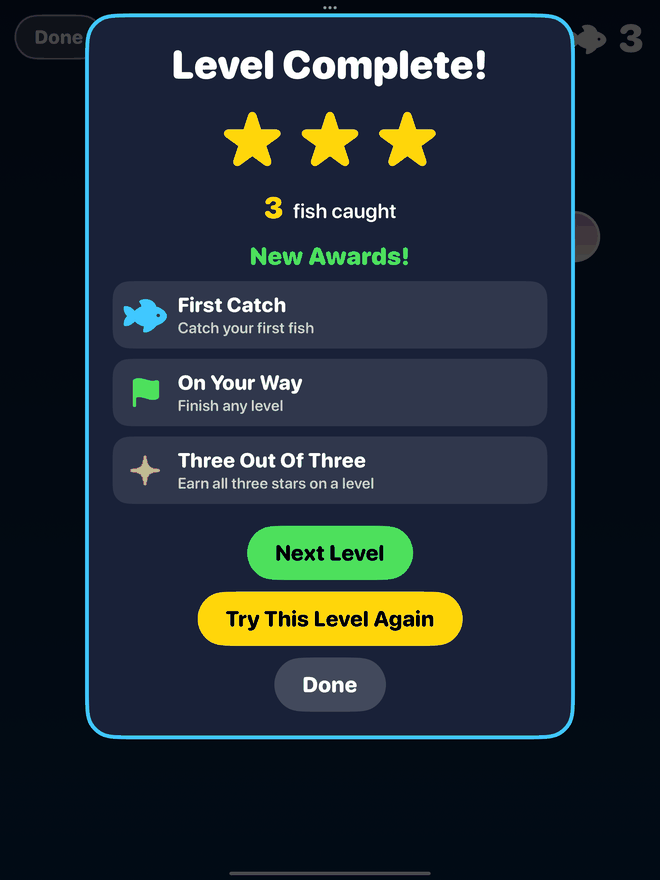
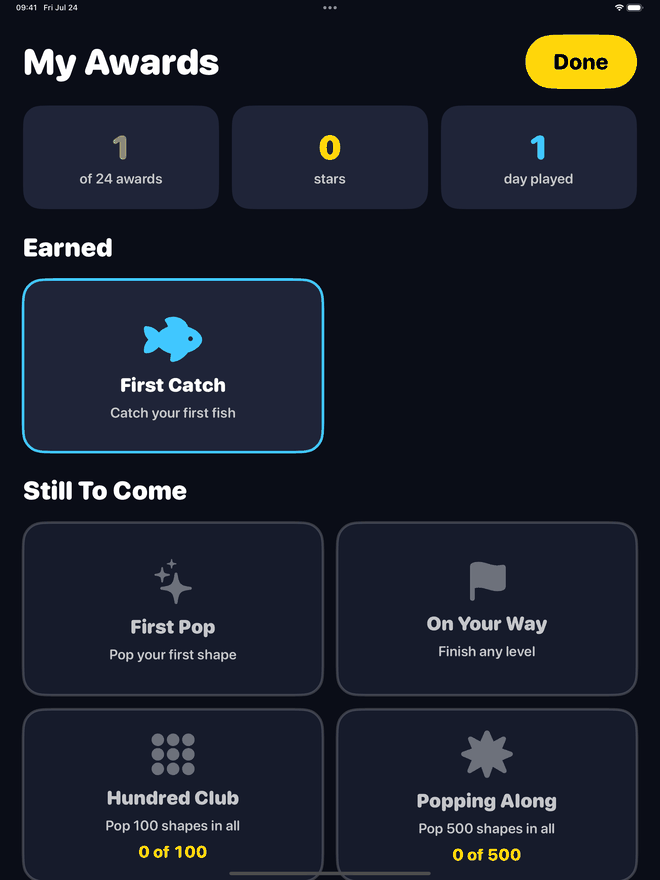
Every session, levels and Free Play alike, ends on a result card that turns the round into something permanent: a personal best, a star, an award. The hub opens with your running totals, right at the top where you cannot miss them.
- 24 awards, from First Pop and First Catch in your opening minute to Grand Tour for finishing every level in the app.
- Partial progress is always visible on the awards shelf: "78 of 100", so you can see exactly how close you are.
- Nothing can be lost. Every award is a count that only goes up.
- A gentle run of days: play on consecutive days and the counter grows. Break it and the app does not mention it, does not nag, and does not sell you a way to fix it. There are no notifications at all.
- Game Center is optional: seven leaderboards and 24 achievements mirror your local progress if you are signed in. If you do not sign in, the app quietly leaves it alone.
Free, and then one payment
You get a whole game before anyone asks you for anything.
No trial countdown, no energy meter, no ads. Four games are free in unlimited Free Play, and the first three levels of each are free as well, so you have actually held the levels and the stars in your hands before you decide.
Free to keep
- Peripheral Pop, Balloon Burst, Shape Sort and Fishing in unlimited Free Play
- Levels 1 to 3 of each of those four games
- All 24 awards, the stars, the result card and the day counter
- Comfort Zones, sounds, vibrations, Dark and Bright, extra players
- Game Center leaderboards and achievements
- No ads. Not one.
The one-time unlock
- Every remaining level of the four free games
- Color Match and Memory Lights open up, Free Play and levels alike
- One purchase, and nothing else is for sale: no hints, no lives, no cosmetics
- Bought once, kept, on every iPad and iPhone signed in to your Apple Account
- Family Sharing enabled, so the person who set the iPad up does not pay twice
- No subscription. Restore Purchases sits right there in Settings.
Twelve free levels against 78 in the unlock, plus two whole extra games. The unlock is offered in exactly three calm places: a locked game card, a locked level, and a row in Settings. It is not offered during play, not after a round, and not on the result card, because being asked for money the moment you finish something is a miserable way to be treated.
Privacy
We keep a record of the games, not of you.
The app sends us a record of how the games are played, so we can make them better. It goes to a server we run ourselves. No advertising network, no analytics company, no data broker, nobody else at all.
- No account, no sign-up, no password. Open it and play.
- Nothing about your Comfort Zones. Which parts of the screen are hard for you to see is yours, not ours. We record only that you finished the setup.
- Nothing timing how fast you respond. There are no timers in this app and there is no stopwatch on you either.
- No advertising identifier, no tracking, no third-party frameworks. Nothing is sold or shared.
- Your progress stays on your device. Player names, comfort zones, scores, stars and awards are stored locally.
- Deleted when you ask. One message to the contact form and what we hold is erased, server side. Your stars and awards are untouched.
Who it is for
If "make the text bigger" was not really the problem.
People with low vision
Built for people living with macular degeneration, and comfortable for anyone dealing with reduced contrast sensitivity, glare, or colors that no longer separate the way they used to. WonderVision is games, and only games. It makes no health claims whatsoever.
Anyone tired of tiny buttons
Big targets, forgiving taps and no time pressure help a lot of people who would not call themselves low vision: unsteady hands, new glasses, a bright room, a long day.
The family who set up the iPad
Setup is nine circles and a Done button. There is no account to create, no subscription to explain later, and Family Sharing means one purchase covers the household. Add a player and you can take a turn without touching their stars.
Questions
Straight answers
What makes it different from other "accessible" games?
Most games treat accessibility as a settings screen bolted on at the end: a colorblind palette, a text size slider, subtitles. WonderVision was designed for low vision from the first line of code. Targets are 150 to 250 points across, nothing tappable is smaller than 64 points, every hit gets an extra 44 points of grace radius so a near miss still counts, every color is paired with a distinct shape and a spoken name, and every scoring event has both a sound and a vibration. The menus are giant tappable panels rather than standard lists, because a hub you need reading glasses for defeats the whole point.
What exactly are Comfort Zones?
On first launch the app shows nine big circles in a three by three grid and asks you to turn off any that are hard for you to see. Every game that places something on screen then biases placement away from those spots. If the middle of the screen is unreliable for you, the games stop asking you to work there. It takes about fifteen seconds, it can be redone any time from Settings, and each player on the iPad has their own.
It is a comfort preference and nothing else. Nothing is scored, nothing is diagnosed, and no result is recorded anywhere.
Are there timers or ways to lose?
No, and not as an option either. There is no countdown timer anywhere in WonderVision. Nothing is scored on speed. A target you do not reach simply fades away, a shape dropped in the wrong place glides quietly home, and a fish that gets away just swims off with a friendly message.
Finishing a level always opens the next one, whatever your score. Stars are separate and only add: they count the things that slipped past, and you have unlimited time to avoid every one of them.
Is it suitable for someone with macular degeneration?
That is exactly who it was designed to be comfortable and fun for. The Comfort Zones grid exists so the games can keep the action out of the parts of the screen you cannot rely on, including the center. Colors are high-luminance and always paired with a shape, so nothing depends on telling similar hues apart. Sound and vibration accompany every event, so you can follow what is happening without needing to see it clearly.
To be completely clear: WonderVision is a set of games. It is not a medical device, not therapy, and not a test, and it makes no claims about anyone's eyesight or health.
Which games are free, and what does the unlock add?
Peripheral Pop, Balloon Burst, Shape Sort and Fishing are free in Free Play, which is unlimited with no goal and no end, and the first three levels of each of those four are free as well. That is twelve free levels and four complete games before you are asked for anything.
The single optional purchase, Unlock the Six Games, opens the remaining 78 levels and adds Color Match and Memory Lights. Current pricing is shown in the App Store, since it varies by country.
Is there a subscription?
No. There is exactly one in-app purchase, it is bought once, and it is yours to keep on every iPad and iPhone signed in to your Apple Account. It is Family Sharing enabled, so the person who set the iPad up does not have to buy it twice, and Restore Purchases is right there in Settings.
There are also no ads, no consumable hints or lives, no energy meters and no limited-time offers. There is nothing to fail, so there is nothing to sell you a rescue from.
Do I need Game Center or an internet connection?
Neither. Game Center leaderboards and achievements are a bonus layer that mirrors your local progress when you happen to be signed in. If you do not sign in, the app does not mention it and nothing is missing: your awards shelf, your stars and your personal bests all live on your device. The games themselves need no connection at all.
What does it collect about me?
There is no account and no sign-up, and nothing is sold, shared or used for advertising. The app does send us a record of how the games are played: which game and level, how a session ended, stars and awards earned, settings changed, whether the purchase went through, and frame rate on your device. It travels with a random identifier we generate for the app, not your name and not an advertising identifier, to a server we run ourselves.
Two things are deliberately not collected: anything about your Comfort Zones, and any measurement of how fast you respond. Ask us through the contact form and we will delete what we hold, leaving your stars and awards alone, and records expire on a schedule in any case. The full privacy notice spells all of it out.
Can two people share one iPad?
Yes. Add as many players as you like in Settings. Each one gets their own comfort zones, their own sound and vibration preferences, their own appearance choice, and their own stars, awards and personal bests. Switching players takes one tap.
Does it work on iPhone too? What does it need?
It is a universal app and runs on both iPad and iPhone. The iPad is the design target, because a bigger screen means bigger targets and it is the device this audience most often plays on, but everything works on iPhone. It needs iPadOS or iOS 16 or later, and it works in portrait or landscape.
Does it use VoiceOver?
Every interactive element in the menus, the level ladder, the settings, the awards shelf and the result card carries a plain spoken label, written in friendly words: "yellow star" rather than "sun target". VoiceOver can play the games too: target games expose one target at a time as an actionable control, Shape Sort exposes pieces as buttons, Fishing exposes a Reel In action during the tug, and Memory Lights exposes its panels during the player's turn.
Big, bright, patient games. Nothing to lose.
WonderVision Games is available on the App Store and Google Play. Four games are free to start, with no ads, no subscription, and nothing sold or shared about you.